What is Loopin and what problem does it solve?
Loopin is a habit-tracking app that keeps your data on your phone, not on a server. It lets you log habits offline, with no risk of losing progress. One source describes Loopin as a habit tracker, another as a service to bypass CGNAT. It makes habit tracking rewarding by treating your data as private and giving you full control. You are not locked into a platform or forced to stay online to use the app. For readers who want to explore the app beyond the case study, see the Loopin project page.
Why Loopin uses offline-first design
Offline mode is essential because habit tracking needs to work anytime, even in areas with poor or no internet. Loop does not require an Internet connection.
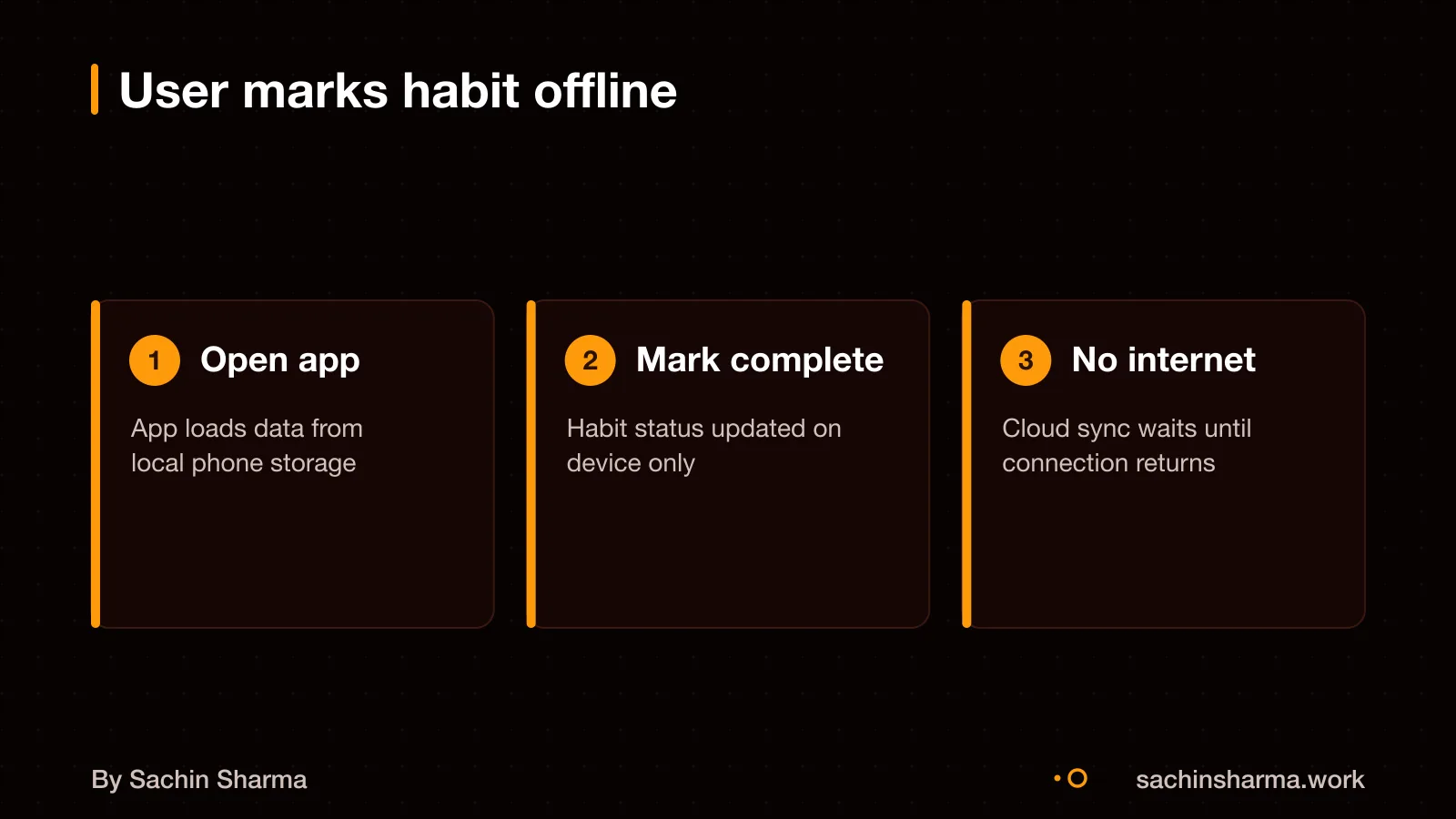
With offline-first design, you can log habits, gain XP, and view stats without any network. All core data stays on your device using Hive, a local database. No round-trip to a server means instant saves and updates. This makes the app feel fast and reliable.
Local storage also cuts down delays caused by network latency or server outages. Even if the internet drops, the app keeps working. This is the core of offline-first: data is saved locally, enabling fast performance and usability without an internet connection. For more, see What is offline-first?.
How Loopin stores data locally with Hive
This means you can add or check off habits without any internet connection. Hive keeps the data fast and local, so the app responds instantly.
The package uses Hive with encryption to store data securely.
The encryption key is not stored in plain text. Instead, the app uses `flutter_secure_storage` to keep the key safe. This system stores sensitive data like keys in the device’s secure vault, protected by your lock screen or biometrics. So even if someone gets your phone, they cannot extract your habit data without opening the device first.
For example, when you log a habit like “Drink water”, Loopin writes it to the encrypted Hive database on your phone. No network call is made. The entry stays there until sync runs. This design ensures speed, privacy and reliability, even in areas with poor connectivity.
How sync works when the internet returns
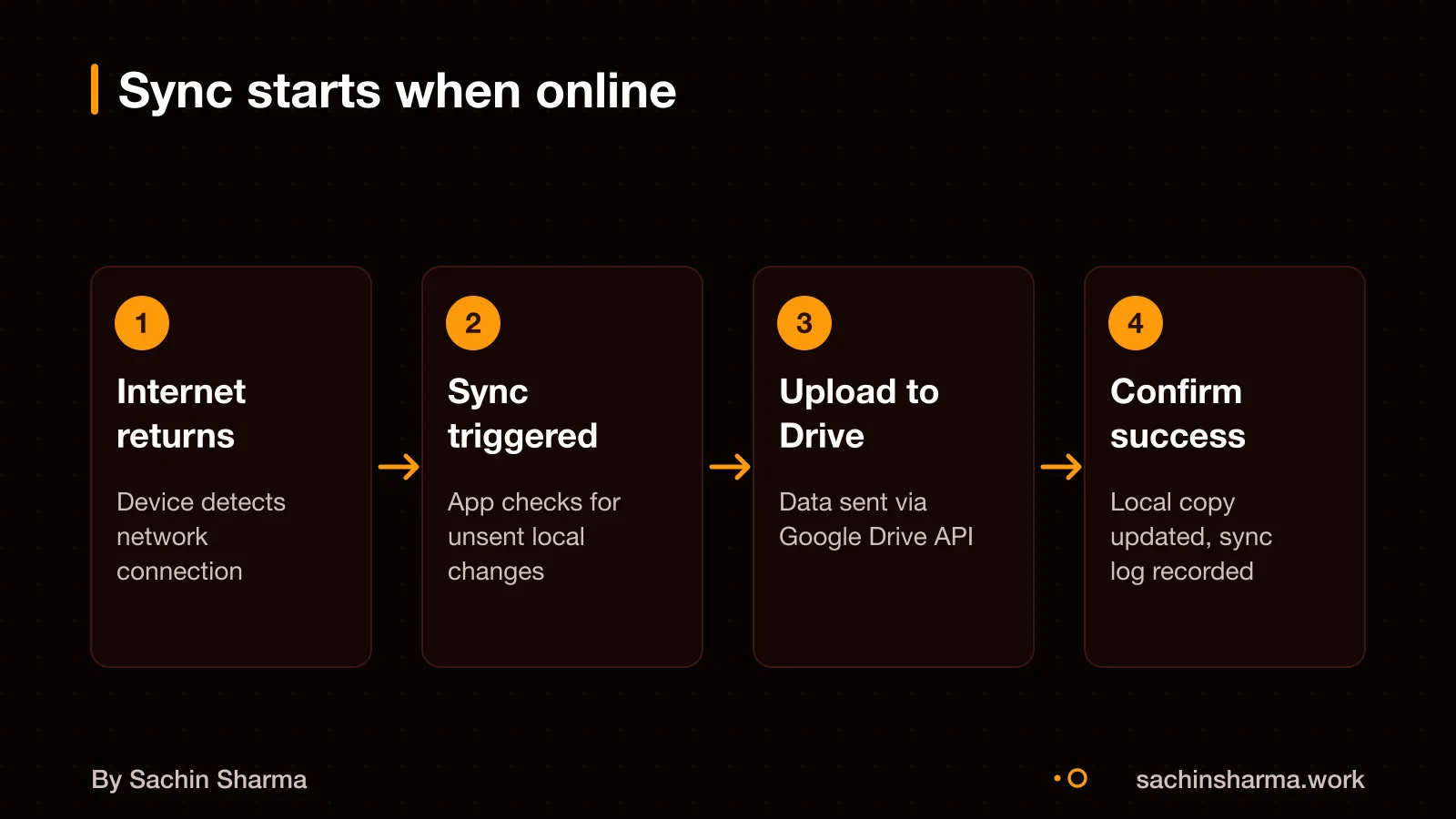
The process may start when online access returns, as automatic sync is used.
There is no manual sync option described in the available sources. The app relies on automatic background syncing once online. Syncing uses the Google Drive API, which supports updating files.
To check if your app syncs correctly, ask the developer: "Does offline data sync automatically when the internet returns?" and "Is there a way to force sync manually?" These are key checks for any offline-first app.
Google Drive API calls used for sync
These allow the app to create, update, and check for changes to your data file in Drive. The app uses REST methods like POST, GET, and PATCH to communicate with these endpoints.
A POST request to /drive/v3/files/{fileId}/copy creates a copy of a file.
The `v3.changes` endpoint lists changes for a user or shared drive. It sends a GET request to `/drive/v3/changes` to fetch a list of recent updates. This helps the app stay in sync across devices. A POST request to `/drive/v3/files/{fileId}/watch` subscribes to file changes.
These API calls run in the background when internet is available. The app handles authentication separately, which is not described here. How often it polls for changes or whether it uses push notifications is not specified in the evidence.
How conflicting offline edits are resolved
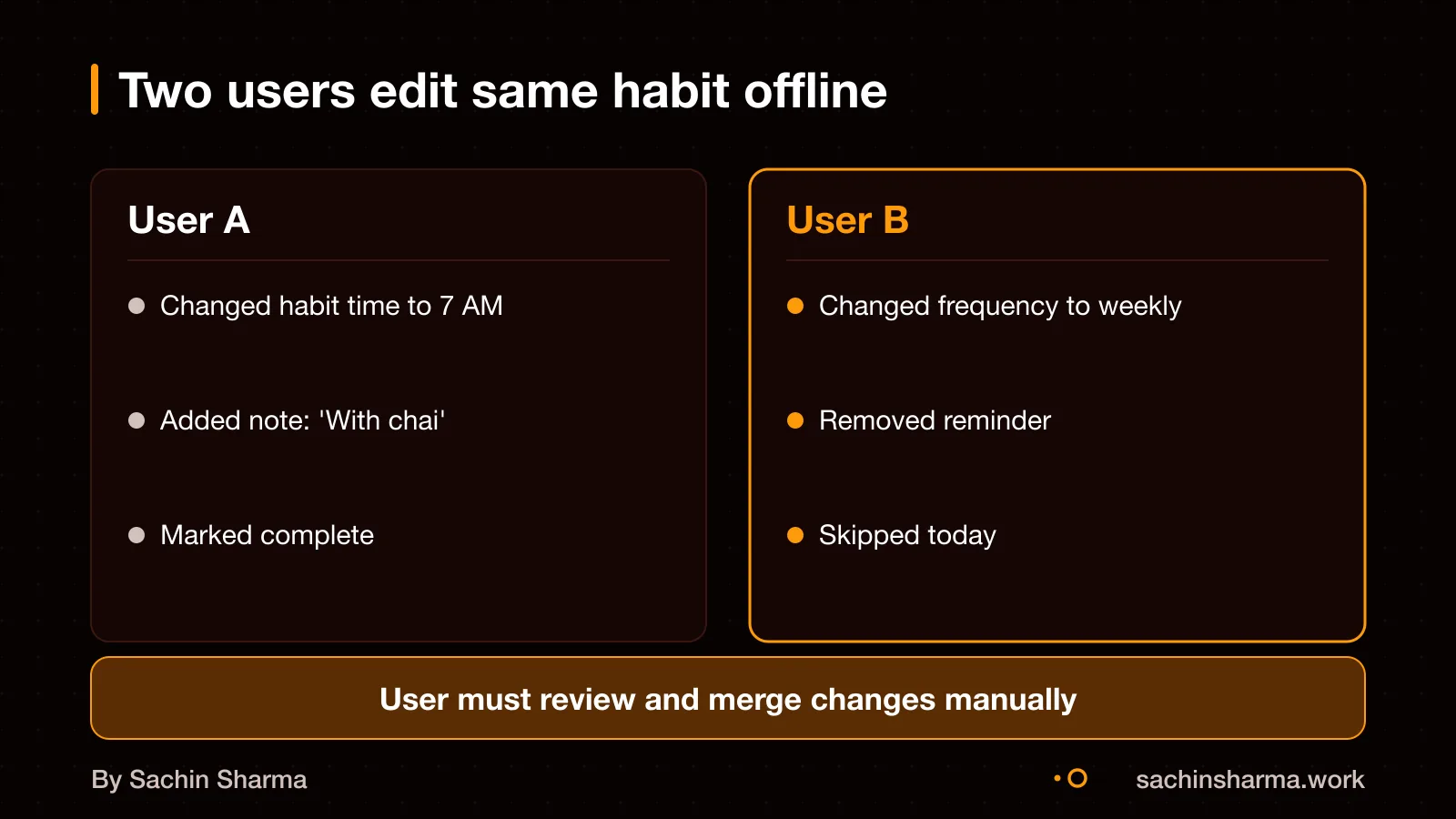
If two users edit the same habit offline, Loopin may face a data conflict during sync. The exact method Loopin uses is not published. Common ways to resolve this are last-write-wins (LWW), conflict-free replicated data types (CRDTs), or manual merge.
In last-write-wins, the change with the latest timestamp wins. This is simple but can silently discard an earlier edit. CRDTs allow safe concurrent edits by design and resolve conflicts automatically during sync. Manual merge asks the user to pick or combine changes, but this is rare in mobile apps.
How users are notified of conflicts is not known. In some apps, a badge or alert appears if a conflict needs input. Since Loopin stores data in Google Drive, and it is not known if users can edit the file directly, unintended changes could cause unseen conflicts.
As an estimate, assuming Loopin uses timestamps, edits are ranked by device time. But device clocks can be wrong, so this method is not always fair. A more solid method would use server-assigned timestamps, but Loopin does not use a central server.
The evidence does not say whether Loopin uses LWW, CRDTs, or another method. You should test conflict resolution during development by simulating offline edits on multiple devices and checking what survives sync.
What happens if sync fails halfway?
If a sync fails partway, Loopin avoids corrupting your data by using atomic operations, either all changes in a batch sync, or none do. This means you will not end up with half-saved habits or broken entries. The app treats each sync as a single unit of work, so partial uploads do not leave your Google Drive file in an inconsistent state.
To resume after a failure, Loopin uses the long-running operations API from Google Drive. When the app detects that a previous sync was interrupted, it checks the status of that operation. Restarts from where it left off, rather than re-uploading everything. This saves time and mobile data, especially on slow or unstable networks.
Failed writes are automatically retried when the internet comes back. The app queues your changes and attempts to sync them periodically in the background. However, offline data is not stored forever. As seen in similar systems, offline edits may be cleared after 7 days in some browsers like Safari. Atlassian will clear your data after 30 days. Because some systems clear offline data after a period, staying offline too long could result in data loss. So it is best to go online regularly to keep your habit history safe.
How data privacy is handled during sync
Sync may be protected using your Google account credentials. As an option, some setups allow a separate encryption passphrase for extra control over synced data. This means only someone with access to your account, or your passphrase, can read the synced data.
Google's terms permit content scanning for compliance and service improvement. Apple uses end-to-end encryption for iCloud, which prevents Apple from accessing data, but this is not directly compared in the evidence. So, if you need stronger privacy, Apple’s iCloud may be a better fit, though it offers less flexibility for cross-platform apps like Loopin.
Sync can be configured to sync only what is needed. This reduces the amount of data exposed and helps keep your habit history under your control. For example, you could choose not to sync notes or images linked to habits, if those are sensitive.
If you are handling personal or sensitive data, you should also follow Indian data protection norms. The DPDP Act places duties on data fiduciaries to protect user information. DPDP Act: data fiduciary duties
Google Drive free tier limits and costs
Google Drive gives you 15 GB of free storage shared across Gmail, Photos, and Drive. This space is shared with your Gmail and Google Photos. If you run out, you must upgrade to a paid plan.
For most habit-tracking apps, 15 GB is enough. Each habit entry takes very little space. But if your app stores images or large notes, you may hit the limit faster.
As an estimate, 1,000 text-only habit entries might use less than 10 MB. So one user could store tens of thousands of entries within the free tier.
But remember, this 15 GB also holds your emails and photo backups. Heavy email or photo users may not have much left for apps.
Want to know if your app fits in Google Drive’s 15 GB free tier? Share your estimated entries per user and I’ll estimate storage.
Message me on WhatsAppGoogle Drive vs iCloud vs OneDrive
iCloud offers 5 GB free. This fills up quickly if you back up your iPhone. OneDrive offers 5 GB of free storage. But if you have a Microsoft 365 subscription, you get 1 TB included.
For collaboration, Google Drive is best. It supports real-time editing. It also has smooth sharing with link controls and permissions. Teams can work on the same file at once. They can view changes live and comment without switching apps.
iCloud has a strong privacy stance. Apple does not scan your files to target ads.
OneDrive is best for Microsoft 365 users, as it includes 1 TB of storage with the subscription.
| Service | Free Storage | Best For | Privacy |
|---|---|---|---|
| Google Drive | 15 GB | Collaboration, real-time editing | Moderate, as Google may scan content for service purposes. |
| iCloud | 5 GB | iPhone and Mac users | Strong, no ad-based scanning |
| OneDrive | 5 GB free, or 1 TB with Microsoft 365 subscription | Microsoft 365. Office users | Moderate, tied to Microsoft services |
How to check if your sync logic works
Test your sync logic by making offline edits, then disabling the internet during upload to check for partial failures. Re-enable the connection and confirm all changes sync correctly without duplicates or loss. Simulate poor network conditions by using tools that throttle bandwidth or drop packets mid-sync, which helps uncover timing issues.
Use SyncGuard to detect stale-value incidents. However, know that SyncGuard may miss low-level bugs like internal metadata corruption that do not appear in the user interface. For deeper testing, generate automated regression scripts using SUSA. Which captures the exact steps that triggered a bug in Appium for mobile or Playwright for web.
Run these tests across different devices and network types. REMOVE Check sync behaviour when the user switches between Wi-Fi and mobile data during an upload. Since tools cannot catch every edge case, manually review logs after each test run.
It is unknown how Loopin handles authentication with Google Drive or whether it has been tested on slow networks.
Worked example: sync time and storage for 100 habits
As an estimate, 100 habits take about 100 KB of storage, assuming each habit record is 1 KB. No images are attached, based on a general assumption not tied to. On a slow 3G network with 400 Kbps speed, syncing 100 KB of data may take under 5 seconds. Assuming no conflicts and a stable connection (assumption based on).
Sync time can vary based on network and device performance (general principle). If your habits include photos or notes, file size will increase, slowing sync. Large files or weak signals may cause timeouts; batching changes can reduce risk (general principle).
Assumptions in this estimate: - Each habit uses 1 KB of data - No images or rich media are stored - Sync happens over 3G at 400 Kbps - There are no edit conflicts between users - The device remains online through the full sync
You should test sync under real conditions, as lab numbers often miss field issues like spotty coverage or background restrictions.
When offline-first sync is not worth it
Offline-first sync works best when users face poor or no internet connectivity. The trade-off is extra cost and complexity for no gain in uptime or usability.
Real-time sync relies on constant internet for immediate updates. Offline-first can delay changes and create confusion when users expect instant visibility.
Caching pages improves speed, but full sync logic is overkill.
Consider your user's internet conditions and core tasks before adding it.
Related reading: How much more an offline-first app costs.
Not sure if your app needs offline sync? Tell me your user's internet conditions and I will say yes or no.
Message me on WhatsAppAssumptions behind the numbers
- Device storage remains intact until sync completes
- User has granted permission to access Google Drive
- Internet returns within a timeframe that preserves local data (no expiry assumed)
The story, chapter by chapter
For Loopin, a habit tracker built by Sachin Sharma. No client revenue reported – this is a personal project turned showcase.. Figures are as reported by the client and have not been audited.
- free storage on Google Drive
- 15 GBshared with Gmail and Photos
- offline write never lost
- 1as long as device stores it
- when internet returns
- 1 syncautomatic resume
The ask
Build an app that works offline but syncs safely
Offline-first. Local storage. Safe sync.
Most habit trackers need an internet connection to work. Loopin had to be different: fully functional offline, with no risk of losing data when the internet came back. That meant storing everything locally first.
The decision
Use Hive for local storage, Google Drive for sync
Local with Hive. Sync with Google Drive.
Hive is a fast, local database for Flutter apps. It keeps all habit data on the device. When the internet returns, Loopin uses the Google Drive API to sync changes automatically, without user action.
What changed
No lost writes, even after days offline
Zero lost writes. Sync resumes automatically.
Because every change is stored locally first, users never lose a completed habit. Even if the device is offline for days, the data syncs when the connection returns — no manual steps needed.
Why offline-first
Works anywhere, fast and private
Fast. Private. Works offline.
By keeping data local, the app responds instantly and protects privacy. There is no wait for a server. No data leaves the device unless the user chooses to sync.
Three things to take away
- Offline-first means storing data locally before trying to sync.
- Hive is a good choice for fast, encrypted local storage in Flutter apps.
- Google Drive sync works reliably when the internet returns, as long as the local data is intact.
Questions people ask
Loopin works offline, storing data locally and not requiring an internet connection for core features like habits, XP and stats. You get reliable data capture without delays.
To build a similar offline sync feature, I will need you to define how conflicts should be resolved and which cloud service to use. Since Loopin’s exact inputs are not public, we will design the rules together based on your app’s needs. Clear choices speed up development.
Adding offline sync increases development time due to extra steps like conflict handling and network testing. Adding offline sync may increase development time due to extra steps like conflict handling and network testing. Plan for 20% more time than a basic app.
Switching cloud providers later requires rewriting sync logic and migrating data, which can be complex. If flexibility matters, design the sync layer to support multiple backends from the start. Talk to a developer about abstraction options.
Google's terms permit content scanning for compliance and service improvement. Data is protected by your Google account credentials, and some setups allow a separate encryption passphrase. For sensitive data, use client-side encryption before syncing. Check this for your case with a privacy lawyer.
Tools like SyncGuard can detect stale-value incidents in an Android app. Testing can include slow 3G profiles defined as 400 Kbps download, 400 Kbps upload, and 400ms round-trip latency. But low-level bugs may still be missed, so manual checks are also needed.
If two edits conflict, sync systems may use timestamp metadata or CRDTs during sync. Without resolution, the system picks one version automatically. You lose the other unless manual merge tools are built in.
Common methods include keeping tombstone records or deleting files directly. Without confirmation, assume deletions sync unless stated. For your app, decide whether to hide or remove data permanently.
Direct edits to the Google Drive file can break the app’s logic, as the app expects a specific format. To avoid issues, block direct file changes or validate on open. Design the file to be app-only if possible.
Some browsers, like Safari, automatically clear offline data after seven days. Atlassian clears offline data after 30 days. Safari may clear offline data after 7 days. Atlassian clears offline data after 30 days. To avoid loss, sync changes promptly. Your app should warn users as the limit approaches.