What is an AI feature, and do you need one?
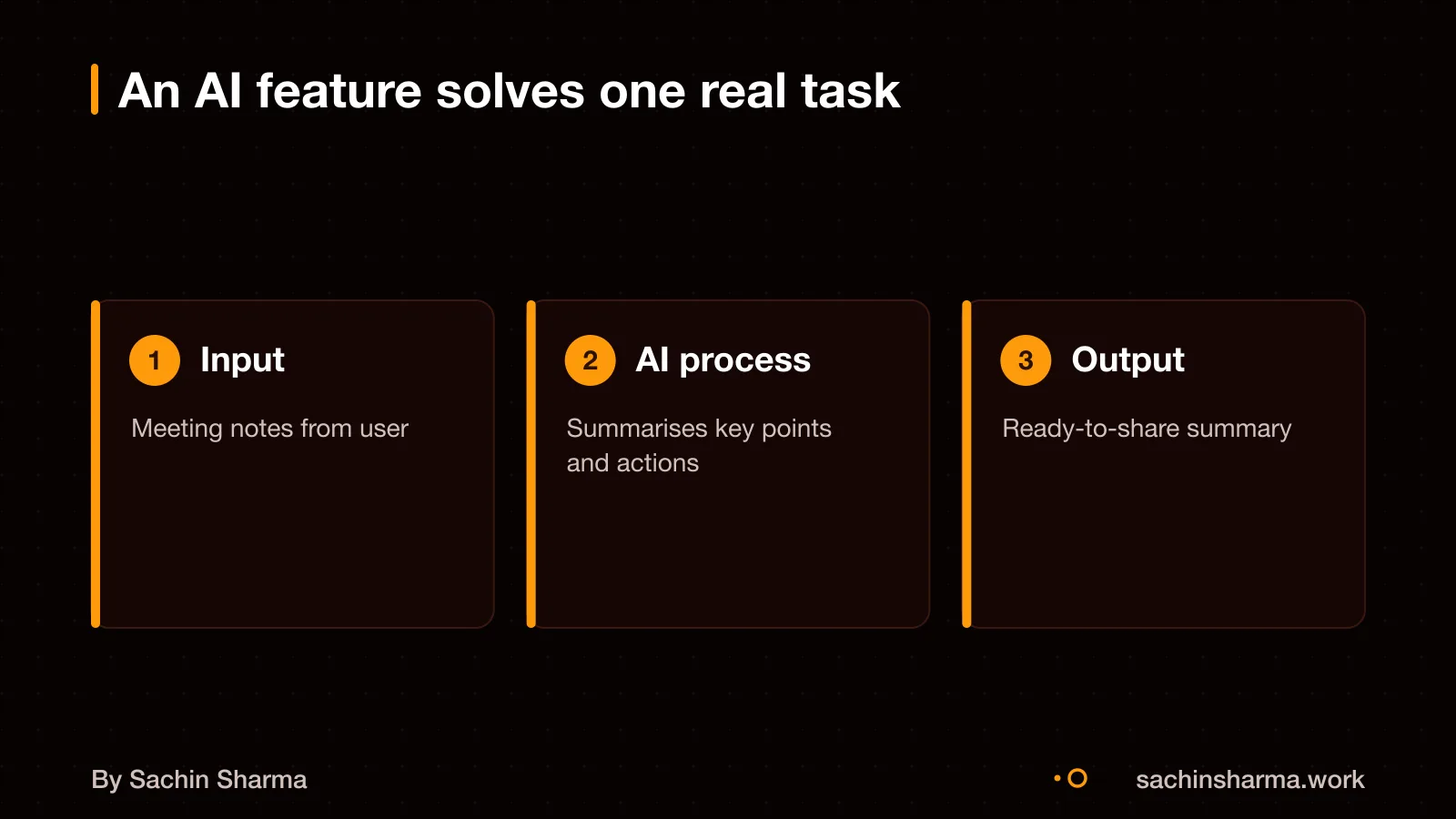
An AI feature uses data and patterns to do tasks that feel intelligent, like summarising text or answering questions about documents. It is different from rules or design because it learns from examples, not fixed steps. This helps when the task is too complex or variable for simple code.
AI can improve real tasks such as turning long clinical notes into structured summaries, as in EHR Copilot. Other working examples in Indian apps include chatbots for customer support, sentiment detection for feedback, and document Q&A for legal or financial content.
In India, generative AI app downloads rose from 198 million in 2024 to 602 million in 2025, showing strong user adoption. AI assistants alone grew by 346 million downloads in 2025. These features work best when they solve one clear job with reliable inputs and outputs.
For example, if your app handles customer queries, an AI chatbot can draft replies based on past tickets. But it must be tested and reviewed, not left alone. You can see where AI fits in a real app stack by reviewing common features in quick commerce apps [guides/what-features-does-a-quick-commerce-app-need/].
What drives the cost of adding AI to your app?
Using existing AI APIs is cheaper than training custom models because training an LLM like GPT-3 costs millions of dollars. For example, a chatbot using OpenAI or Google’s Gemini charges by the token, so you only pay when someone types a message. This fits small budgets and early testing.
Running AI on the user’s device cuts cloud costs. Built-in AI in Chrome runs models directly on the user's device. All computation happens locally, so there are no cloud inference costs. This keeps your costs low and user data private.
But AI becomes expensive at scale when you rely on cloud-based models. Each request adds up, and high traffic can lead to large monthly bills. Also, preparing clean, structured data for AI takes time and skill, which adds to the cost.
You save more when your app can use on-device AI for simple tasks like form suggestions or voice commands. For complex jobs like generating reports, cloud APIs may still be needed.
The cost to build a full app is higher than adding one AI feature, as it includes design, backend, and testing across all screens.
Want a number for your idea? Send one line on WhatsApp. I reply with what drives the cost and what to cut.
Message me on WhatsApp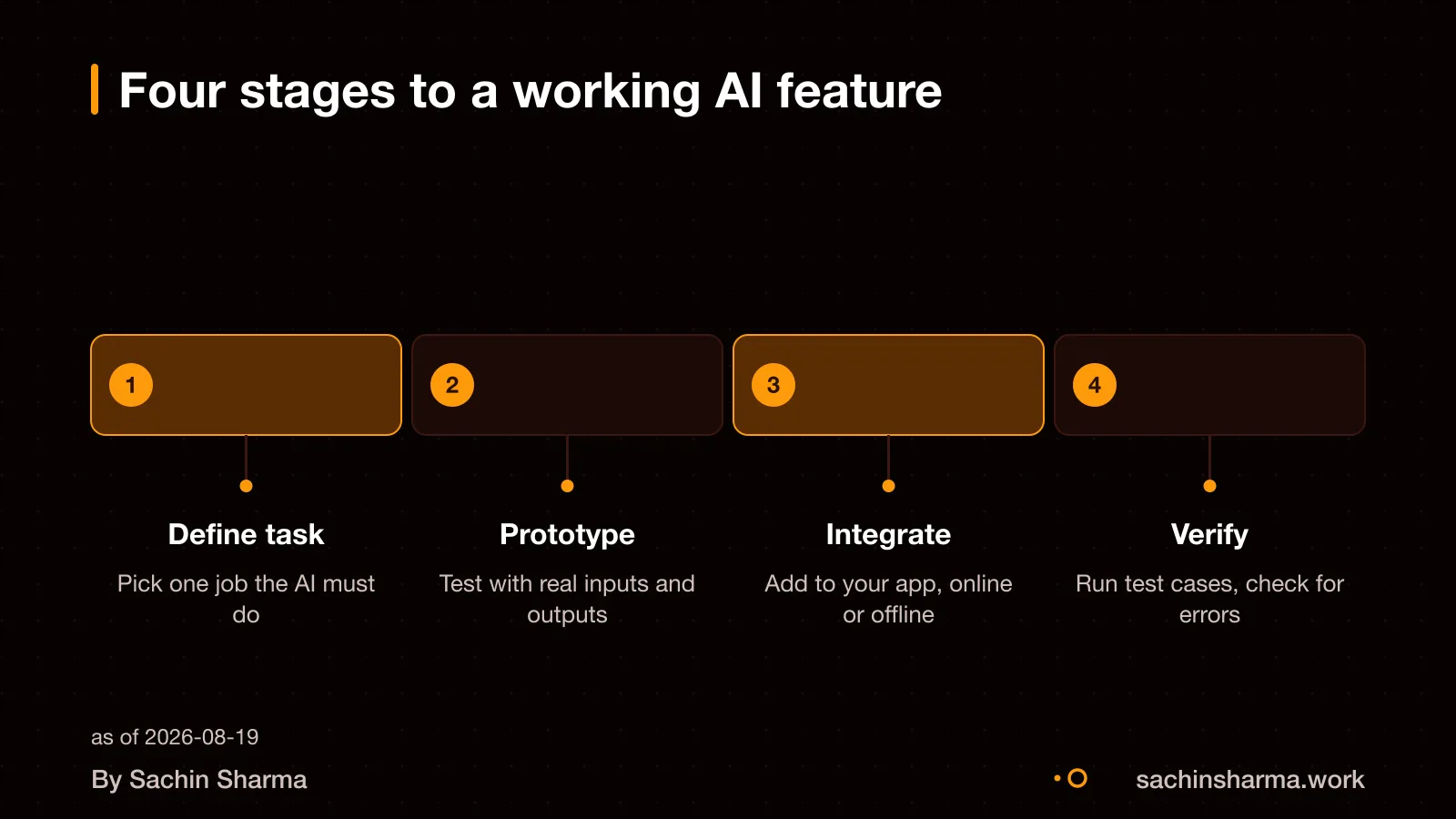
How long does it take to build and integrate?
Adding an AI feature to your app takes 4 to 12 weeks. Depending on whether it runs on your device or the cloud, and how complex the model is. If your app uses on-device AI that works offline, setup takes longer because the model must download first. However, once set up, these models can run fast if the user’s device has hardware acceleration like a dedicated AI chip or GPU. This means performance can match or even beat cloud-based AI in some cases. But complex models such as GPT-5.5 Pro take more time to respond. Because they always reason step by step before answering, and they are not meant for simple chat tasks. Integration time also depends on your app’s current state, older code or missing APIs may add 1 to 3 weeks of prep work. For example, adding offline AI to a Flutter app with a clean state management setup is faster than retrofitting it into a tangled codebase.
Use existing APIs or build a custom model?
Start with OpenAI, Google AI, or similar APIs if you want to test fast. These tools let you add smart features like text summaries or chat without building from scratch. EHR Copilot turns psychiatric session transcripts into structured SOAP notes.
Use a custom model only if your business depends on strict data privacy, full control, or unique behaviour that public models cannot match. For instance, if your app handles medical or legal data that must not leave your servers. Training a model on your own infrastructure may be needed. But this path needs large data, deep expertise, and ₹1 crore or more in cost, a rare need for small businesses.
Most businesses should not train models from scratch. The time, data, and money required are too high. Existing APIs are accurate, fast, and improve over time. You can always switch later if your needs change. Focus on solving your user’s problem, not managing AI infrastructure.
Still unsure between using OpenAI or building custom? Tell me your budget and data sensitivity and I will say which fits.
Message me on WhatsAppWhat data do you need to provide?
You must provide clean, validated data. AI models learn from patterns. They amplify errors in messy inputs. Bad data leads to wrong predictions. It also causes wasted time and higher costs. I will not start building until your data passes an audit.
Data pipelines turn raw inputs into AI-ready formats. These are automated steps. They pull data from sources like forms, files or logs. They remove duplicates, fill gaps, and structure the data for training. For example, if you want AI to classify customer complaints, the pipeline will gather messages from WhatsApp and Email. It will strip out emojis. It will tag each by topic. It will save them in a standard format.
A data audit checks whether your data is fit for AI. It looks at volume, variety, and validity. I will ask: Is there enough past data? Are labels accurate? Are there biases? For instance, if you have 10,000 support tickets but only 200 are tagged, the audit flags this. You need more labelled examples before we proceed.
Think of data in three levels: raw (untouched), partially cleaned (structured but not checked), and AI-ready (validated, labelled, and balanced). Most Indian small businesses start with raw or partial data. That is why I often suggest automate paper and WhatsApp workflows first. This helps build clean digital records.
What are the risks of adding AI to your app?
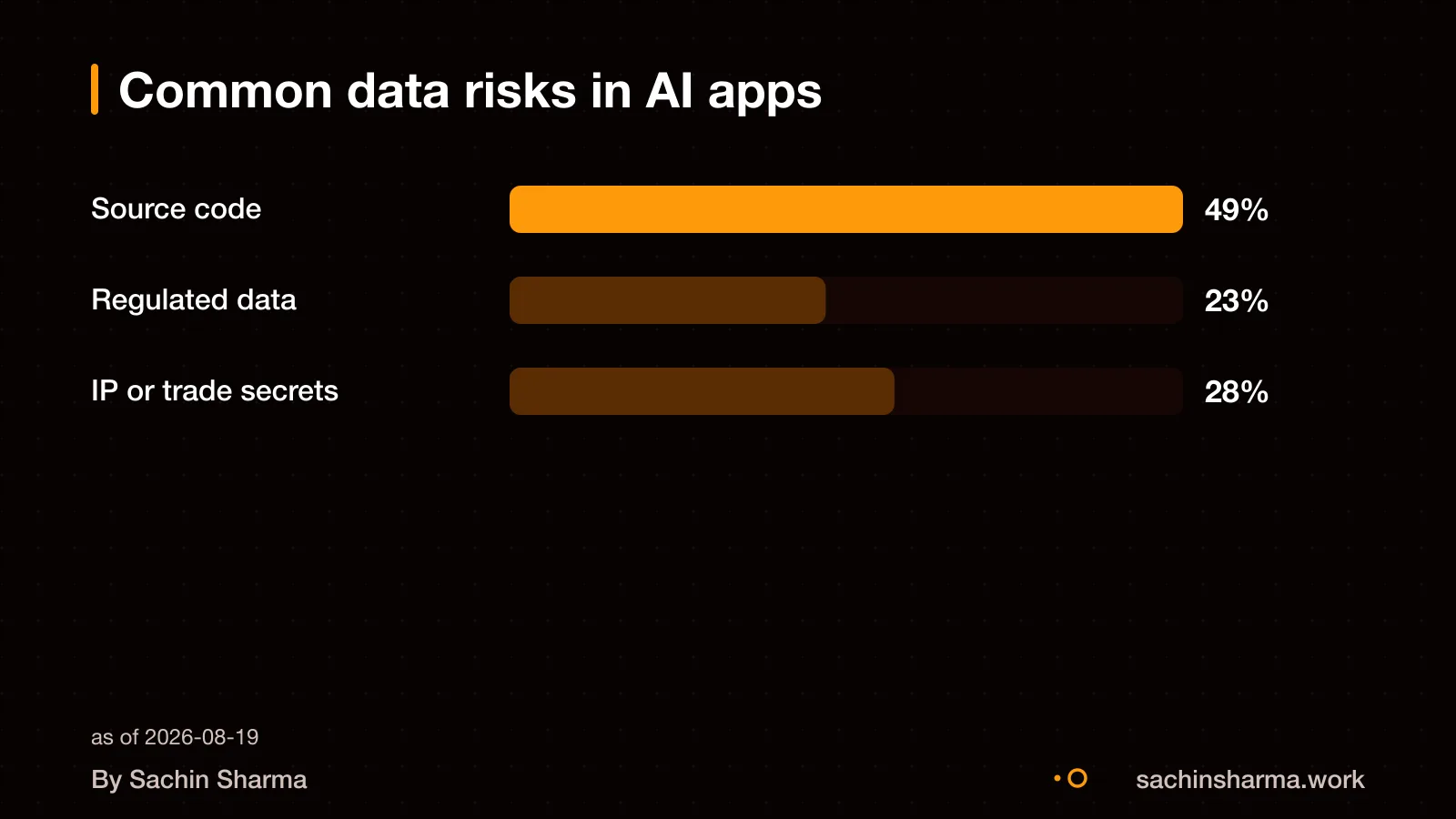
AI can leak your source code or regulated data if inputs are not controlled. Indian organisations recorded more than 3,000 AI-related data policy violations a month on average. Source code alone accounted for 49% of these breaches. If your app handles health, legal or financial data, a single leak could lead to legal action or loss of trust. For example, sending patient records to a public AI model without consent breaks privacy norms, even if the model is accurate.
Poor data causes silent failures in AI. Models trained on incomplete or stale data produce unreliable outputs. Unlike broken code, these failures do not crash the app, they go unnoticed. For instance, a sales forecast model fed outdated inventory logs may suggest wrong stock levels, hurting decisions over time.
Bias and privacy violations happen when AI learns from skewed or personal data. A hiring tool trained on past resumes may favour one gender if historical data lacks diversity. Even anonymised data can be re-identified using AI, raising risks under India’s Digital Personal Data Protection Act. Always test for fairness and limit data to what is strictly needed.
If your app handles regulated data like prescriptions or contracts, see how to handle it safely [handling regulated data in apps].
Who owns the code, model, and data?
You get full ownership of the code I write for your app. This means you can update, host, and sell it without needing my permission. The code does not include third-party AI models, which are accessed through APIs and remain owned by their providers.
API keys for these models are set up per project. As an example, tools like Lovable can automatically generate and manage API keys so you do not need to handle billing or credentials yourself. I integrate these securely so your app can call the model without exposing keys.
You must confirm your rights to any data used to train or prompt the AI. If you use customer records, legal documents, or health notes, ensure you have consent or legal grounds under Indian data laws. I do not store or reuse your data unless you ask me to in writing.
When AI feature development is not for you
If your data is poor or incomplete, AI will not work well. AI models need clear, accurate and enough data to learn from. If your records are missing, outdated or inconsistent, the AI will give wrong or random results. First, fix your data pipeline or start with a simpler tool.
When your task follows clear rules, use a rule-based system instead. For example, sending a reminder when a form is left half-filled does not need AI, it needs a trigger and a message. Rule-based automation is cheaper, easier to test and more reliable for predictable jobs.
If your budget is small, start with automation, not AI. AI needs time and money for data prep, testing and tuning before it works well. You may get better returns by first automating manual steps with simple scripts or tools. Build up to AI once you have stable workflows and good data.
You can still get results without AI. Many tasks only need structured logic or integration. For example, syncing form responses to a spreadsheet or auto-filling invoices can be done without machine learning.
Related reading: common features in quick commerce apps, cost to build a full app, how EHR Copilot uses AI, handling regulated data in apps.
Next step: message me on WhatsApp with what you want to build. No forms, no sales team.
Message me on WhatsAppAssumptions behind the numbers
- API cost is estimated based on projected monthly usage tiers.
- Reader provides clean, structured data ready for AI processing.
- On-device AI is preferred to reduce cloud cost and latency.
- Model selection starts with existing APIs unless control is key.
What is in it, and what is not
AI features built in four stages: Define, Prototype, Integrate, Verify. Runs on clean data with clear goals. You own the code.
- 01Written scope with AI features named
Which AI behaviours you want, what data they use, and how they connect to the rest of the app.
- 02Prototype with test cases
Working AI behaviour on your device, with test inputs and expected outputs agreed in writing.
- 03Data pipeline setup
If needed, I wire raw data into clean, AI-ready formats through automated pipelines.
- 04Model selection guidance
Whether to use existing APIs or custom models, based on your data and control needs.
- 05Offline or cloud path chosen
On-device AI cuts cloud cost and works offline; cloud gives more power for complex tasks.
- 06API cost assumption noted
If cloud APIs are used, I state the usage tier and estimated monthly cost as an assumption.
- 07Full handover
Code in your repo, keys in your name, and a short doc on how the AI parts fit in.
How it runs: milestones you can test
- 1Define
You can test: Agreed scope listing AI features, data sources, and success criteria.
- 2Prototype
You can test: Testable AI behaviour on your device with sample inputs and outputs.
- 3Integrate
You can test: AI features wired into the app flow, tested with your data.
- 4Verify
You can test: Final checks, API cost noted if used, and full handover done.
Right for you if
- You have clean, structured data ready for AI use.
- You want a specific task automated or improved, not a general assistant.
- You prefer on-device AI to save on cloud costs and keep data local.
Look elsewhere if
- Your data is raw, messy or incomplete.
- You need a large team or complex infrastructure beyond app scope.
- You want a fixed price on a one-line AI idea with no defined task.
How it is priced
No fixed price upfront. I write a scope first, then a staged cost. AI adds effort in data prep, model choice and testing. Cloud API cost is stated as an assumption if used. You pay per milestone, not per hour.
Questions to ask before you sign, with anyone
- Who will prepare the data for AI?
- Is my data clean enough for AI use?
- Will this run on-device or in the cloud?
- What is the estimated API cost per month?
- Can I test the AI output before it goes live?
Quick answers
Why not train a custom model?
Existing APIs are faster and cheaper for most tasks. Custom models are worth it only if control, privacy or unique behaviour is key.
Does on-device AI work offline?
Yes, once the model is downloaded. It avoids cloud cost and keeps data local.
Do I own the AI code?
Yes. All code, keys and accounts are handed over in your name from the start.
What if my data isn’t clean?
AI fails on bad data. I can build a pipeline, but you must supply clean, structured inputs.
Can AI run on low-end phones?
On-device models use hardware acceleration to match cloud speed. Older devices may struggle with large models.
How do you pick the model?
Based on your data, task and privacy needs. Start with existing APIs unless control is critical.
Are cloud APIs expensive?
It depends on usage. I state the tier and estimated cost as an assumption if used.
Questions people ask
It starts with a one-line idea sent over WhatsApp. I then check if your idea fits with what AI can do and what your app needs. If it does, we discuss scope, data, and timeline.
We agree on communication tools and frequency at the start of the project. Common choices are WhatsApp for quick updates and weekly email summaries. Message me to set up what works for your team.
You own your data. I do not store or reuse it without your consent. You are responsible for data privacy compliance under Indian law. Check this for your case with a data protection lawyer.
Support, updates, and monitoring are agreed upon per project. There is no standard package. We define the terms before delivery so you know what to expect after launch.
Testing happens in stages, and you review each step before we move forward. Final acceptance is your call. If it does not meet the agreed goals, we revisit the inputs or logic.
Chrome's built-in AI, for example, works offline once the model is downloaded.
Yes, I set up data pipelines and run quality checks to make your data ready for AI. This includes cleaning formats, fixing gaps, and ensuring real-world relevance.