What is the real difference between Next.js and WordPress?
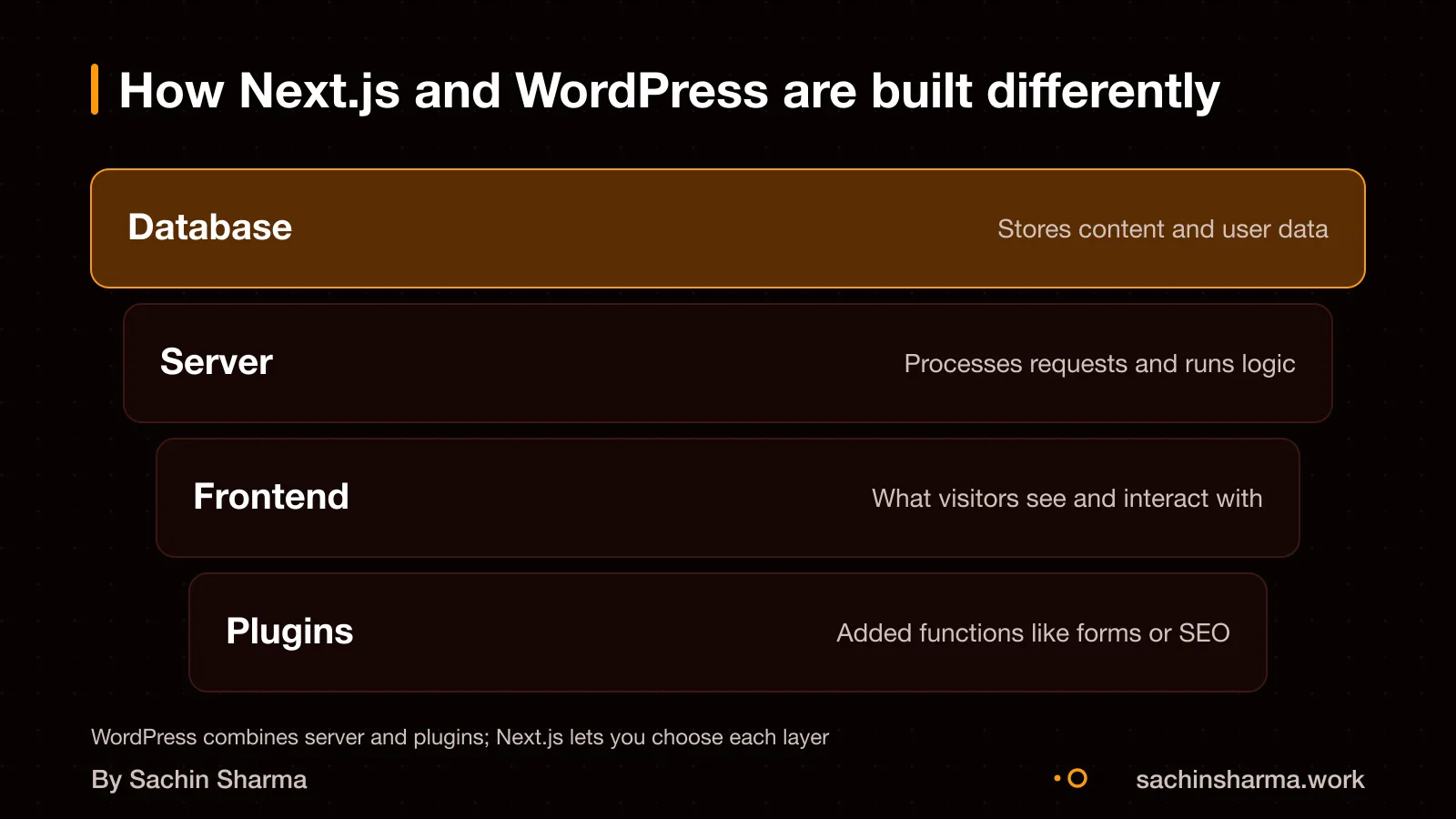
Next.js is a full-stack framework for building custom web apps, while WordPress is a content management system (CMS) made for publishing websites fast. No, Next.js is not just a faster WordPress, it lets you build features from scratch. Like user dashboards or real-time tools, which WordPress cannot do without heavy plugins. WordPress works best when you need a standard site with pages, blogs and forms, but it gives you less control over how the site runs. Next.js, being code-first, gives you full control over performance, data flow and custom logic. For example, I built EHR Copilot in Next.js to turn doctor notes into structured records. If you want a custom app or readymade app trade-off explained, that page covers it in detail.
Which one costs less: Next.js or WordPress?
Next.js has higher upfront costs but lower long-term costs, while WordPress is cheaper to start but more expensive to maintain. A basic WordPress site in India costs ₹15,000 to ₹30,000. Next.js development costs more initially due to custom code, but long-term hosting and maintenance are cheaper. Over time, Next.js can save money, especially when hosted on platforms like Vercel with low ongoing fees.
One business cut its monthly stack cost from $400 to $25 after moving a WooCommerce site to headless Next.js on Vercel. As an estimate, assuming a small business with monthly traffic of 50,000 visits and basic e-commerce needs. The annual hosting cost for WordPress with plugins and managed hosting could be around ₹3.6 lakh. For a Next.js + Vercel setup, it could be as low as ₹30,000, not including developer time.
Long-term savings with Next.js come from fewer plugins, no licensing fees, and efficient static hosting. WordPress may need paid themes, security plugins, and developer support for updates, raising costs over time. However, if you need only a simple site and do not plan to scale, WordPress remains the lower-cost starting option.
Want a number for your idea? Send one line on WhatsApp. I reply with what drives the cost and what to cut.
Message me on WhatsApp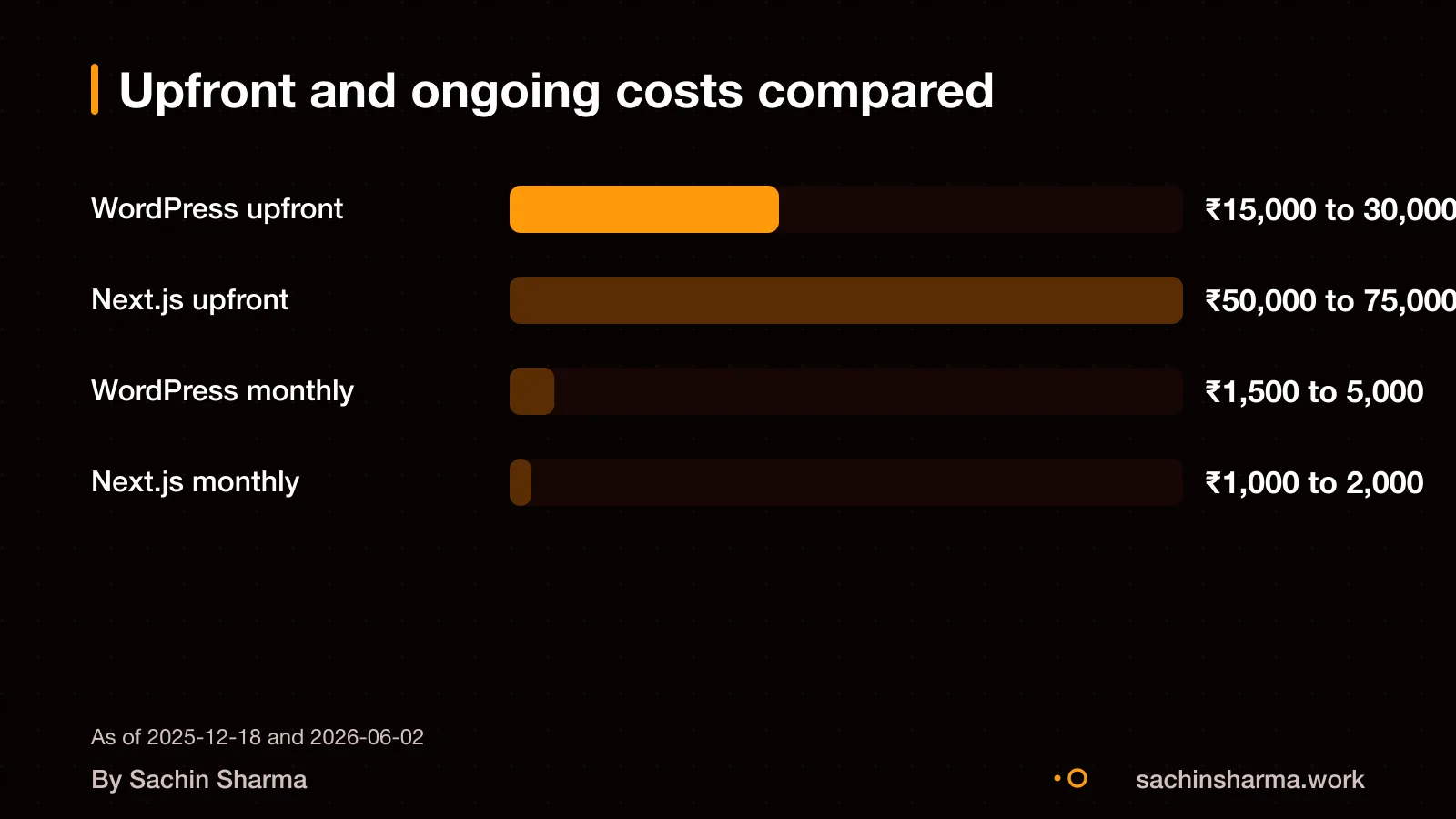
How long does it take to launch each platform?
You can launch a basic WordPress site in 2 to 3 weeks. This is fast because templates and plugins do most of the work. If you need custom features or an online store, it may take 6 to 8 weeks.
Next.js takes longer because it is built from scratch. It needs planning, custom code, and testing. My work on EHR Copilot and Daily required full-stack logic and secure APIs. You cannot launch a real Next.js site in a week.
A faster launch does not always mean faster results. A rushed site may lack performance, SEO, or mobile support. A Next.js site like FlashDrop takes longer to build but is optimised for performance on slow networks. Speed matters if your customers use 4G in tier-2 cities.
Which one handles custom features better?
Next.js can scale to complex web applications with thousands of pages, while WordPress struggles with custom functionality beyond what plugins provide. You can build a booking system in WordPress, but only with plugins or costly custom code, and it may not fit your workflow exactly. WordPress relies on third-party plugins that can break or slow down your site.
Next.js scales effortlessly from a simple landing page to a complex web application with thousands of pages. WordPress struggles when you go beyond standard features, often needing expensive developers to patch gaps. A headless WordPress setup, where WordPress only manages content and Next.js handles the front end, can be a middle ground. But it still adds complexity. If your site needs more than pages and posts, Next.js gives you full control without hidden limits.
If you are unsure whether you need an app or just a website, read about whether to build an app or website first.
Can I switch from WordPress to Next.js later?
Yes, you can switch from WordPress to Next.js later, but it takes effort and cost. SEO is preserved if you set up proper redirects and carry over metadata correctly. This means each old page must point to its new version, and titles, descriptions, and keywords must be moved across.
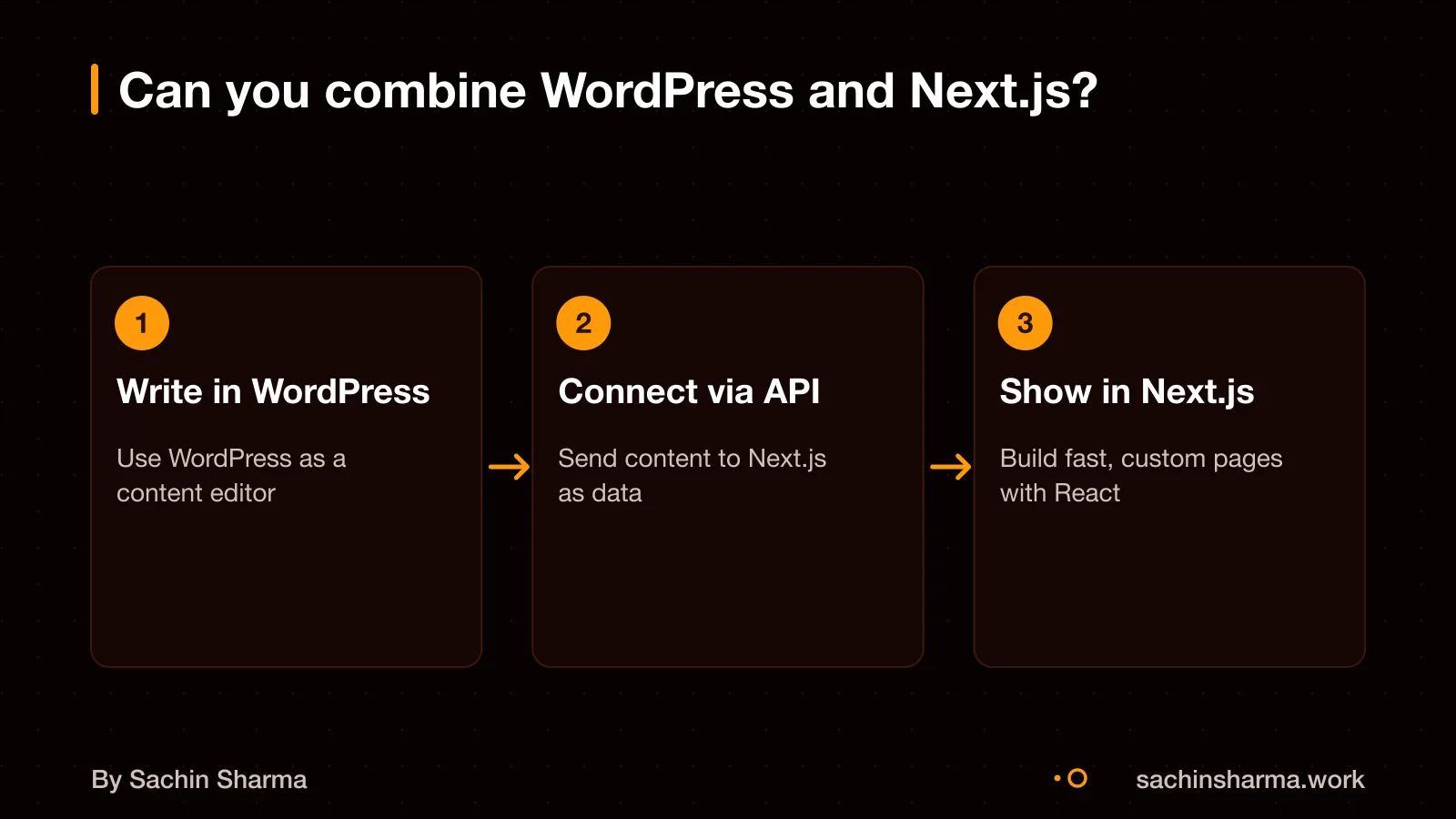
Content can move, but not automatically. You will need to export your posts and pages and restructure them for Next.js. If you keep WordPress as a headless CMS, your content stays in WordPress, and Next.js pulls it via API using tools like WPGraphQL. This reduces migration work but keeps you tied to WordPress.
Migration cost depends on your site size and features. As an estimate, a 30 to 50 page site without complex features costs between EUR 6,000 and 12,000. That is roughly ₹5.5 to ₹11 lakh at current rates. Custom forms, user logins, or e-commerce increase the cost.
Simple blogs move easier. Sites with memberships, bookings, or custom plugins need more rework. You cannot switch with a click, it is a project of its own.
What are the risks of choosing WordPress?
A security breach is likely if your site uses outdated plugins or weak passwords. Ninety-six percent of disclosed WordPress vulnerabilities in 2024 came from third-party plugins, not the core software. These flaws can let hackers deface your site, steal customer data, or inject spam links, which harms your brand.
A breach can cost between ₹1 lakh and ₹15 lakh in direct losses, with additional costs for SEO recovery.
Slow speed may affect user experience if your site uses many bloated plugins. Slower load times may increase bounce rates, especially for business sites on 4G in tier-2 cities, though exact data is not available [unknowns].
Not sure if your project has this risk? Tell me the plan in two lines and I will say yes or no.
Message me on WhatsAppWhat are the risks of choosing Next.js?
Next.js requires a skilled developer and careful caching design. The mental model is new, with Server and Client Components that can confuse beginners. You must design caching carefully, or your site may slow down under load. As a result, you need a developer who knows full-stack patterns, not just a designer who uses templates.
Support for Next.js 15 ends in October 2026. After that, you will not get security updates unless you upgrade to a newer version. This means you must budget for updates every 12 to 18 months. Security patches come about once a month, so ongoing maintenance is needed. If you stop support, your site could become vulnerable.
You do not need a full team, but you do need one experienced developer who can handle both frontend and backend logic. Smaller projects can run on solo developers if they know React, Node.js, and the latest Next.js patterns. However, if your developer leaves and no one else knows the code, you may face delays. Code and content ownership after payment is not specified in standard contracts, ask for full handover in writing.
Can you show real examples of each?
Yes, I can show you a working example of a headless WordPress site built with Next.js. The 'next-wp' repository is a headless WordPress starter built with Next.js 16, React 19, and TypeScript. It pulls content from WordPress but renders it through a modern, fast frontend built with Next.js.
You can see how this works in practice: the repository includes a live demo. This shows what a headless setup looks like, WordPress manages content, while Next.js handles design, speed, and user experience.
The full code is open on GitHub at `github.com/9d8dev/next-wp`.
When this advice does not apply
- Next.js has higher setup costs and needs a skilled developer.
- WordPress may not be ideal for static brochure sites or product-first eCommerce stores.
- Custom development with Next.js is overkill when your needs are static and publishing-focused. If your team is still learning React or your host cannot run Node.js, stick with WordPress.
- If your business will not change its website much after launch, a basic WordPress site meets your needs without added complexity.
Related reading: custom app or readymade app, Next.js developer rates in India, how an engagement with me works.
Related reading: how an engagement with me works, Fixed price or hourly: which protects you more?.
Assumptions behind the numbers
- Next.js projects start at ₹1.5 lakh (working assumption based on custom scope)
- Next.js takes 6 to 12 weeks (working assumption for custom features)
- WordPress is suitable for basic content sites (from evidence)
Pick your situation
I build more Next.js sites because clients need custom features and long-term maintainability.
Pick your situation
WordPress wins. WordPress sites can be built in 2 to 3 weeks for basic setups. Next.js needs more time for custom features and setup.
The whole comparison
| Next.js | WordPress | |
|---|---|---|
| Best for | Custom features, speed, scale | Content sites, quick launches |
| Upfront cost | ₹1.5 lakh and up | ₹15,000 to ₹30,000 |
| Time to build | 6 to 12 weeks | 2 to 3 weeks |
| Long-term cost | Low (free hosting tier) | High (plugins, security) |
| Performance | Server-first rendering | Depends on caching/plugins |
| Security risk | Monthly updates | Plugins, outdated core |
Whichever you choose, ask these
- Can I add features later?
- Who maintains it after launch?
- What happens if we stop mid-way?
- Do I own the code?
Questions people ask
I recommend Next.js for businesses that need custom features, control, and long-term savings. It has higher upfront costs but scales well and needs less maintenance over time. This makes it better for growing businesses with unique workflows.
A basic business website costs ₹15,000 to ₹30,000. But long-term costs rise due to plugins, security, and maintenance. Next.js has higher upfront development costs.
Yes, you can migrate from WordPress to Next.js later. A 30 to 50 page site without complex features migrates for EUR 6,000 to 12,000. SEO can stay intact if redirect mapping and metadata handling are done properly.
Ownership of code and content depends on your contract, not the platform. Since this is not specified in the evidence, confirm in writing that you own both the source code and your content before paying. This protects you if you switch developers later.
Yes, you can move your site to another developer if you have full access and documentation. This includes source code, hosting credentials, and setup guides. Make sure your contract requires clear handover steps, regardless of whether you use WordPress or Next.js.
Best practice is to include maintenance after launch to monitor, update, and improve the site over time. This includes security patches, performance checks, and feature updates. Ask your developer to define the support plan before going live.
Yes, WordPress is suitable if your priority is low cost and fast publishing. It is more cost-effective than custom sites because of ready-made themes and plugins. In India, a basic site costs ₹15,000 to ₹30,000.
Yes, Next.js is good for growing businesses because it scales from simple pages to complex apps with thousands of pages. It handles custom logic better than WordPress, which often needs expensive plugins or code for advanced features.
Yes, you can use WordPress as a headless CMS for a Next.js site. It works through the REST API or WPGraphQL, letting editors use WordPress while the frontend runs on Next.js. This gives you modern performance with familiar editing.