What is a Flutter app?
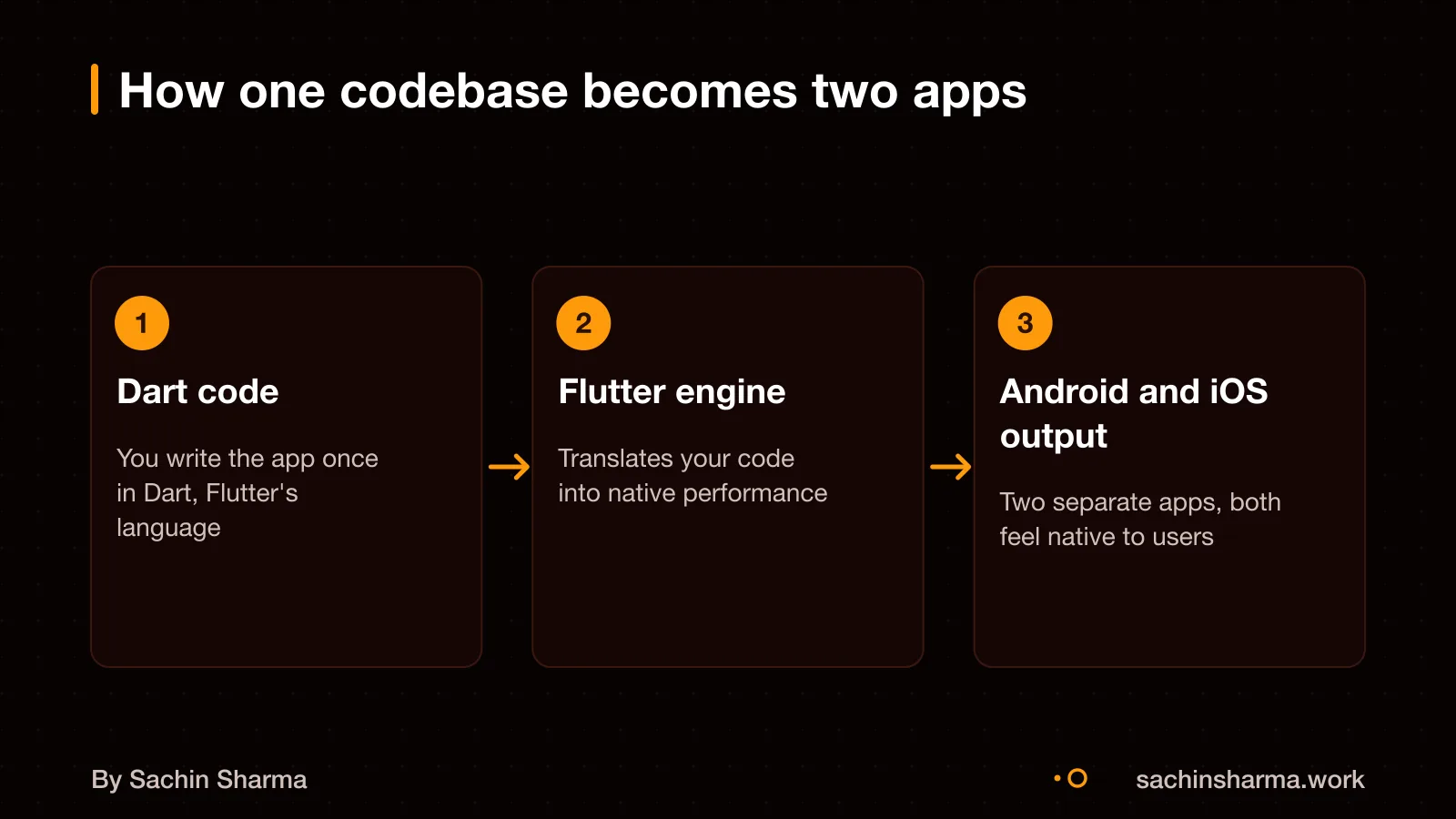
A Flutter app is built with a single codebase that works on multiple platforms, including Android and iOS. This means you save time and cost, as changes apply to both platforms at once. Flutter code compiles to ARM or Intel machine code as well as JavaScript for fast performance on any device. It uses a feature called Hot Reload, so I can tweak the design or fix issues. See the results in seconds without restarting the app. For example, if your clinic booking app needs a new button, I can add it and test it right away. This speeds up development and helps us get to a working version faster. You can think of it like building with blocks that fit both systems. If you are unsure how apps connect to servers, read about what an API is.
Do you need a Flutter app?
A Flutter app makes sense for cross-platform apps, MVPs, and business apps, but is not ideal for platform-specific apps or intensive 3D games. Flutter allows code reuse across platforms. It works well for business tools, customer apps and minimum viable products (MVPs).
Think clinics, local service providers, retail shops or gig teams. If your users are mostly on phones and need offline access, Flutter adds value. Apps like habit trackers, booking tools or internal dashboards run well with it.
But a website or off-the-shelf tool is better if you only need basic info or forms. A Flutter app is not ideal for apps that need heavy 3D graphics or platform-specific speed. Simple needs like a menu, contact form or social feed work fine on a mobile-friendly website. For those, see what a small business website costs.
What changes the cost of a Flutter app?
The biggest cost drivers for a Flutter app are feature complexity, design quality, team location, and platform coverage. Locking your feature scope before development starts is the most effective way to control cost.
Complex features increase cost the most. These include real-time sync, offline-first data handling, payment gateways, AI features, or custom animations. For example, a habit tracker with local storage only is simpler than one syncing across devices via Google Drive. The latter needs secure APIs, conflict resolution, and background sync logic.
Design quality also affects price. A basic, functional UI with standard widgets costs less. A branded, custom design with unique interactions, animations, and accessibility support takes more time and raises cost. You may choose high-fidelity prototypes or live with wireframes to adjust cost.
Team location and platform coverage matter. Building for both Android and iOS at once is a core strength of Flutter, so there is no extra cost for dual-platform support. But if you need a web or desktop version, that adds effort and cost.
Serverless backends are now standard. They cut hosting costs and scale automatically. Still, complex backend logic, user roles, or third-party integrations will add to the total. The safest way to manage cost is to finalise your must-have features first and defer the rest.
What’s included in the base scope?
The discovery phase defines your feature scope and finalises the app architecture, including state management with Bloc or Riverpod, before any code is written. This ensures we build only what your users need and set up a stable base.
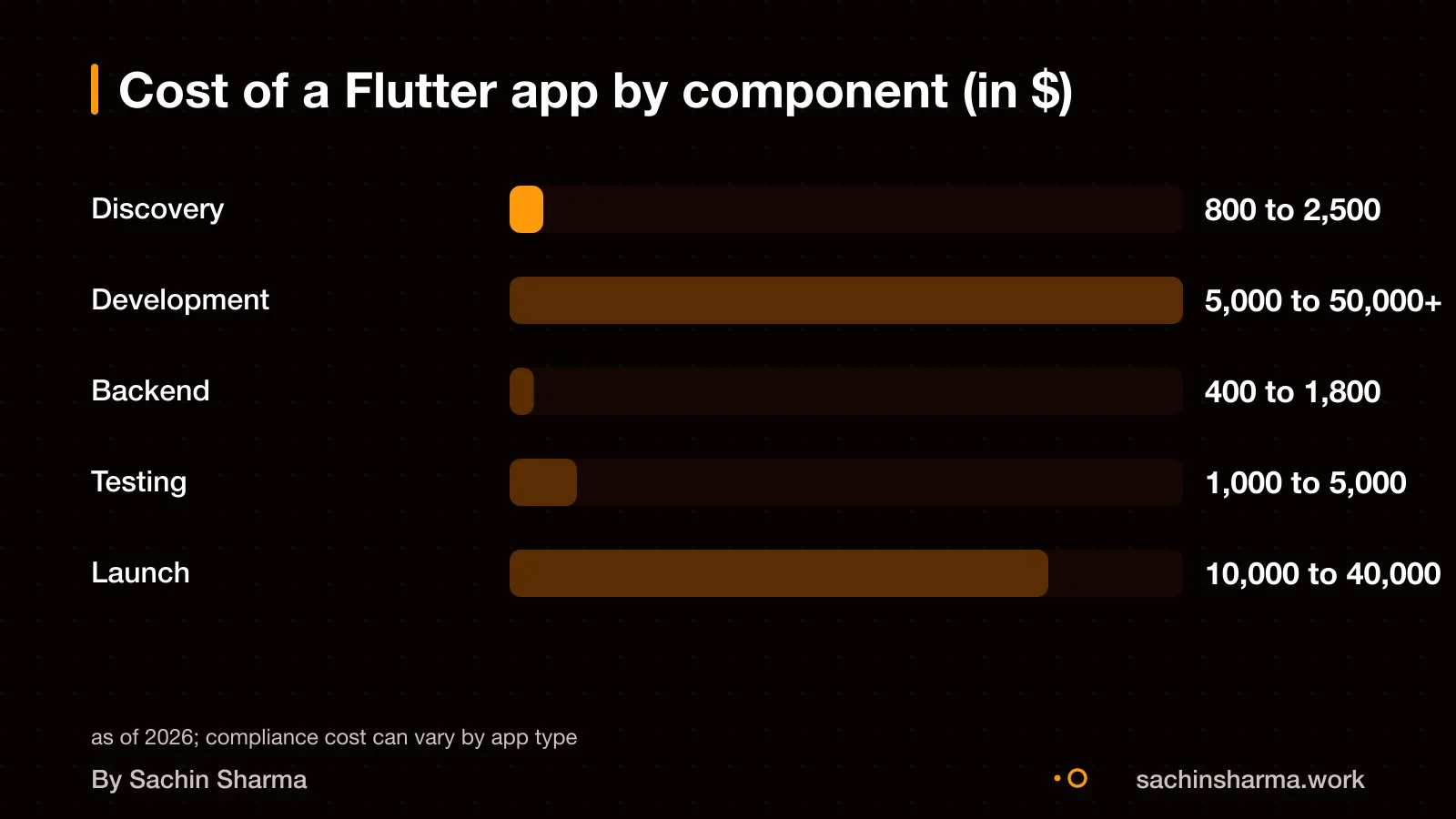
Firebase setup is not part of the base scope and is priced separately. As an estimate, setting up Firebase for your app costs $400 to $1,800. This covers authentication, cloud functions, Firestore rules, and storage buckets tailored to your app.
For full details on services, see what mobile app development includes (Mobile app development: what you get from me).
Want a number for your idea? Send one line on WhatsApp. I reply with what drives the cost and what to cut.
Message me on WhatsAppHow long does it take to build a Flutter app?
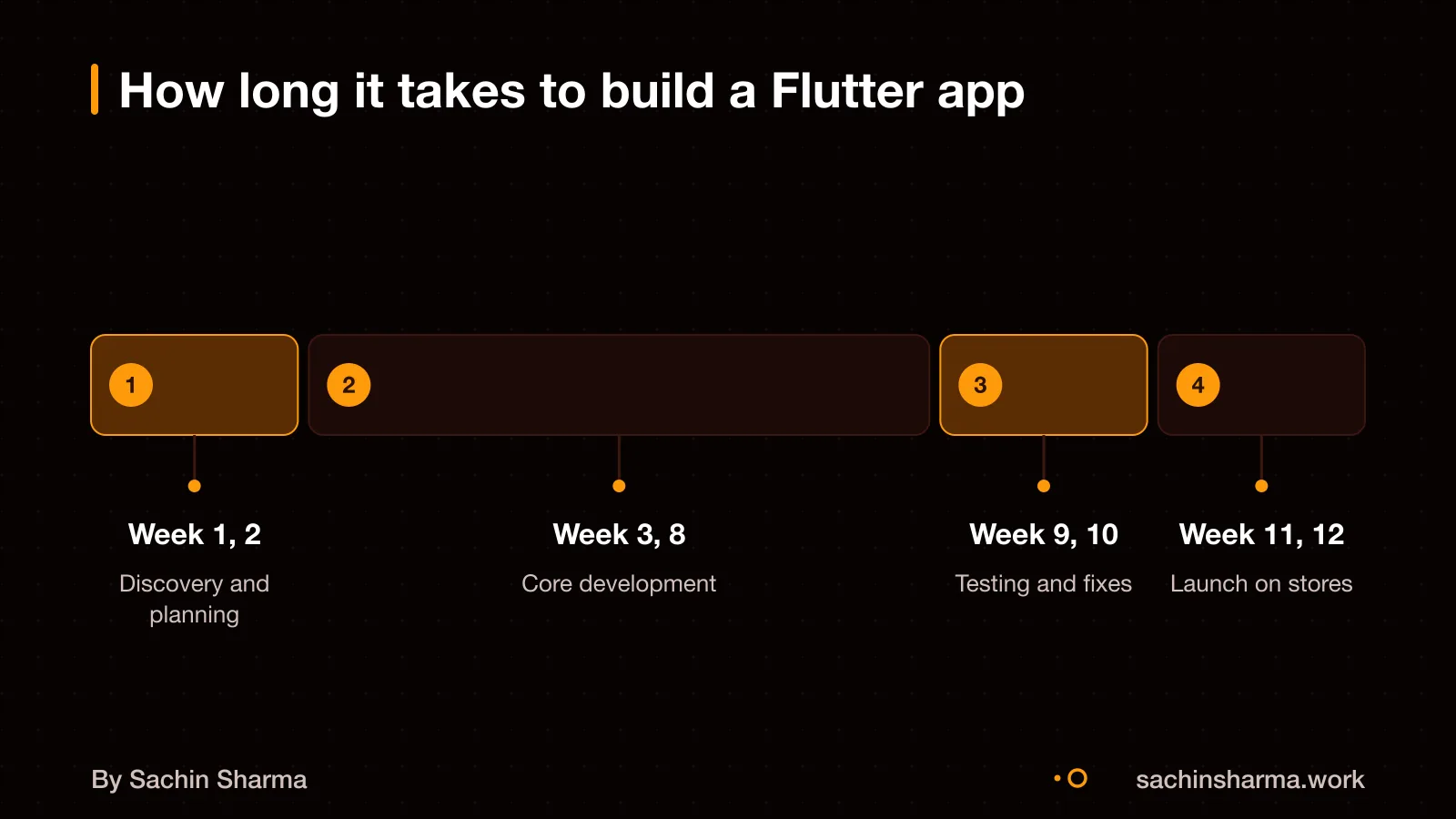
A simple Flutter app takes 6 to 10 weeks to build. This applies to apps with 3 to 8 screens and no custom backend. A typical business app with standard features, such as user login, data sync and admin panels, takes 3 to 5 months. SaaS or enterprise-level apps with multi-tenancy, complex workflows or integrations take 5 to 9 months.
The timeline depends on how fast you can finalise the feature list and design. Once scope is locked, development moves quickly because Flutter reuses code across Android and iOS. You can avoid delays by approving the feature scope early and providing all required content, like text, images and legal details, on time. Changes during development, unclear requirements or slow feedback can extend the timeline, though exact causes of delay are not known.
For example, a clinic booking app with patient registration, appointment scheduling, doctor profiles. A basic admin panel would fall in the 3 to 5 month range. This assumes no major changes are made after development starts.
How is the work scoped and billed?
I use milestone-based billing with a reserve for updates. This means you pay in stages as the app reaches key goals, not by the hour. Each milestone includes a working version of part of your app, so you can review progress early. If you add new features or change core functions later, the cost adjusts to cover the extra work. The payment schedule is structured around milestones, with timing and amounts agreed per project. A reserve may be held for final fixes or updates, as agreed per project. This method keeps costs clear and lets you control the budget. As of March 2026, some mature businesses also use a monthly retainer with an annual reserve for ongoing updates. I recommend discussing your specific needs to confirm how work is structured.
How does GST apply to Flutter app development?
I do not charge GST if you are outside India, as exports of IT services are zero-rated under GST. This means 0% GST applies to Flutter app development services billed to clients outside India.
For B2B clients in India, GST is applied based on your registered location. The place of supply is where you are registered, so your business must report the tax under reverse charge if applicable.
For B2C clients in India, the place of supply is my location, so standard GST rules apply. Since I am based in India, local GST rates would apply to individual buyers or unregistered entities.
The key factor is where the service is consumed, not where I build the app from. Because tax rules depend on your specific case, talk to your CA about your liability.
How does the development process work?
The development process starts with discovery and architecture, where we define your app’s feature scope. Finalise the state management pattern using Bloc or Riverpod. This ensures the app is built on a solid foundation before any code is written. Next, we move into iterative development, during which you will see working builds every 1 to 2 weeks. Each build runs on real devices, so you can test flows and give feedback early.
We use Flutter’s hot reload to update the app in under a second without losing state, letting us tweak logic and UI quickly. This speeds up iterations and keeps changes visible. Testing happens on both Android and iOS devices weekly, not just in simulators, so we catch platform-specific issues early.
The discovery phase itself typically takes 1 to 2 weeks and may cost between $800 and $2,500 for agencies. But with me, it’s scoped to your actual needs and included in the overall project cost. You get a clear plan, a working prototype, and regular progress, no black-box development.
Can I see examples of apps you’ve built?
Yes, I have delivered several Flutter apps for real users and businesses. Loopin is a habit tracker with offline Hive storage, Google Drive sync, and RPG mechanics. It has over 5,000 downloads on the Play Store and has run with zero crashes in production. Legease is an AI legal-document platform that analyses PDFs, uses end-to-end encryption, and runs on iOS, Android, Web, and Desktop. Aashwasan is a Flutter + Firebase gig and contract management app. These apps are in production.
Legease shows how complex workflows like document analysis can work across platforms without losing performance. You can explore Legease: AI contract analysis in Flutter to see a full example of a cross-platform app with AI features.
Not sure if your project has this risk? Tell me the plan in two lines and I will say yes or no.
Message me on WhatsAppDo you own the app and code after it’s built?
Yes, you own the source code once the project is complete and fully paid. The app’s intellectual property belongs to you, not me. Possession does not always mean ownership, so a clear contract is needed to confirm this. I include the handover of all source code as a final deliverable in the agreement.
You must control key accounts like the Apple Developer account, Google Play Console, and domain registrar directly. A startup should carefully consider which accounts it owns and administers. I help you set them up if needed, but they stay in your name.
This means you can switch developers later without being locked in. You get full access to the code and third-party accounts. No part of your app is held back. If you want to take the project elsewhere, you can.
What support do you offer after launch?
After your Flutter app launches, I provide post-launch support that includes comprehensive documentation, handover of automated test coverage, and options for ongoing maintenance agreements. This ensures you can update or scale the app with confidence.
Bug fixes and minor updates are covered during the warranty period included in your project. This covers security patches, OS compatibility, and small feature updates.
For long-term reliability, you can choose a maintenance agreement. This gives you priority support and scheduled updates. The exact scope, such as response time or update frequency, is agreed upon separately based on your app’s needs.
If you prefer to manage updates yourself, I deliver all source code, documentation, and testing tools needed. You can then hand it to another developer or internal team.
Worked example: a clinic booking app
As an estimate, assuming 10 screens, 3 integrations (payment, calendar, SMS), and offline-first design, a clinic booking app costs ₹10.6 lakh to build. This includes ₹6 lakh for base development, ₹3.2 lakh for Firebase setup (assumed), and ₹1.4 lakh for discovery (assumed). Feature complexity drives price: each integration adds $1,000 to $5,000, so three add roughly ₹2.2 lakh at current rates. Offline-first design, like in Loopin, increases effort but improves reliability for Indian users with spotty networks.
Yearly maintenance runs 15 to 20 percent of the build cost, so ₹1.6 to ₹2.1 lakh. This covers updates, security patches, and minor fixes. The estimate assumes no major feature changes. If you add real-time sync or AI features, costs rise. For a precise quote, define your core features, user roles, and must-have integrations.
How to verify app quality before launch
Check the app’s automated test coverage, crash logs, and compliance forms before launch. Good code quality means tests catch bugs early, logs help fix crashes fast, and forms prove you meet legal rules. Flutter gives tools to build reliable apps with testing and diagnostics built in.
Test offline use and edge cases by turning off the internet and trying wrong inputs. Your app should show clear error messages and save progress when the connection drops. For example, a user filling a form should not lose data if the network fails.
Use the Appium Flutter driver to check widget details and take screenshots during tests. You can run `driver.execute('flutter:getWidgetDiagnostics')` to inspect UI elements. Screenshots help spot layout issues on different phones.
You should get a full set of documents: source code comments, API references, user guides, and test reports. These help future developers understand and update the app. If any part is missing, ask for it before launch.
When is Flutter not the right choice?
Flutter may not be the best choice when native performance is critical for your app. It offers near-native speed but can fall short for resource-intensive uses like 3D games or heavy animations. In such cases, native Android (Kotlin) or iOS (Swift) development gives better control and efficiency.
If your app needs deep platform-specific features, Flutter might require extra work. It does not give direct access to all native APIs, so some functions need custom native code. This can slow down delivery and raise costs, especially for rare or new phone capabilities.
App size and startup time are also concerns with Flutter. The framework adds to the app’s size because it bundles its own libraries in the APK or IPA. If you are targeting users with low-storage devices or slow internet, a native or lightweight solution may work better. Consider this if your audience is in rural or tier-3 areas.
Related reading: what a small business website costs, what mobile app development includes.
Assumptions behind the numbers
- Discovery phase cost: $800 to $2,500
- Firebase/backend setup: $400 to $1,800
- Base dev rate: ₹1.2 lakh/week
- Feature complexity and design quality affect time
- Number of integrations affects cost
Work out your own number
Here's how your Flutter app cost breaks down with me. Adjust the sliders to match your needs.
Your working total
₹5,60,00014 weeks × 2 people × 5 days × ₹4,000- Discovery & Architecture14%
- Development57%
- Backend Setup7%
- Testing & Fixes14%
- App Store Launch7%
The weeks shown are an example of a small app, there to be changed. Fees you pay others (store accounts, cloud, SMS) are not in this total.
What moves the price
- More user roles or flows
Each extra role (admin, rider) adds weeks like a mini-app.
- High-fidelity animations
Custom transitions and micro-interactions take more design and code time.
- Offline or sync features
Local storage and sync logic are complex to test and maintain.
- Fewer integrations
Cutting SMS, maps or payment gateways saves ₹1 to ₹3 lakh.
- Basic design from templates
Using starter designs cuts 2 to 4 weeks.
- Locking scope upfront
Changes mid-way cost 2 to 3x more.
Fees that go to someone else
Google Play Developer Account
A one-time ₹2,500 fee paid to Google.
Apple Developer Program
An annual ₹6,500 fee paid to Apple.
Cloud, SMS, Maps, Payments
Usage-based fees paid directly to providers like Razorpay or Twilio.
Ask for these before you sign
- How many user roles and flows are in your app?
- Do you need offline support or real-time sync?
- Which third-party services will you integrate?
- Are you open to starting with one platform?
- What level of design polish do you need?
Questions people ask
A Flutter app build includes discovery, architecture, coding, testing, and launch. The discovery phase defines your feature scope and finalises state management with Bloc or Riverpod. You also get Firebase or Supabase setup for backend services.
Work is scoped and billed using a milestone-based model with a reserve for updates. You pay as the app hits key goals, not by the hour. This combines a fixed monthly retainer with an annual upgrade reserve for maintenance.
Ask your developer for a delivery plan before starting. What you get at each milestone is not known from the available evidence. A clear plan should list deliverables for each stage to avoid confusion later.
Yes, you can move the app to another developer if you have the source code and control key accounts. You must own the Apple Developer and Google Play Console accounts. Possession does not guarantee ownership of intellectual property.
Yes, I handle app store submission, including compliance steps before build and submission. This includes the Google Play Data Safety form and adding a Privacy Policy URL in the store listing.
I use local storage and sync strategies like in Loopin, a Flutter habit tracker with offline Hive storage and Google Drive sync. This ensures data is available offline and syncs when connection returns.
Changes mid-project cost 2 to 3 times more than if planned early. Locking your feature scope before development starts is the best way to control cost and avoid delays.
As an estimate, adding a payment gateway costs ₹80,000 to ₹4 lakh, depending on the provider. This is based on an integration cost of $1,000 to $5,000, converted at ₹80 per dollar.
I use standard tools unless you ask for AI use. There is no evidence that I routinely use AI in development. You should confirm any AI tooling needs with me before the project starts.
Yes, I can build for web and desktop from the same Flutter codebase. This includes extra testing to ensure it works across devices.